Guitar & bass amp sim · Multi-FX · Windows

Studio tone,
deep in the wild.

Plug your guitar or bass into your PC and play real amp tones — neural amps, studio cabinets, pedals and effects. Design a preset just by describing it. No amp, no pedals, no DAW.

9-day free trial then $59 one-time · yours forever Windows 10 / 11
EdgeSound Pedalboard
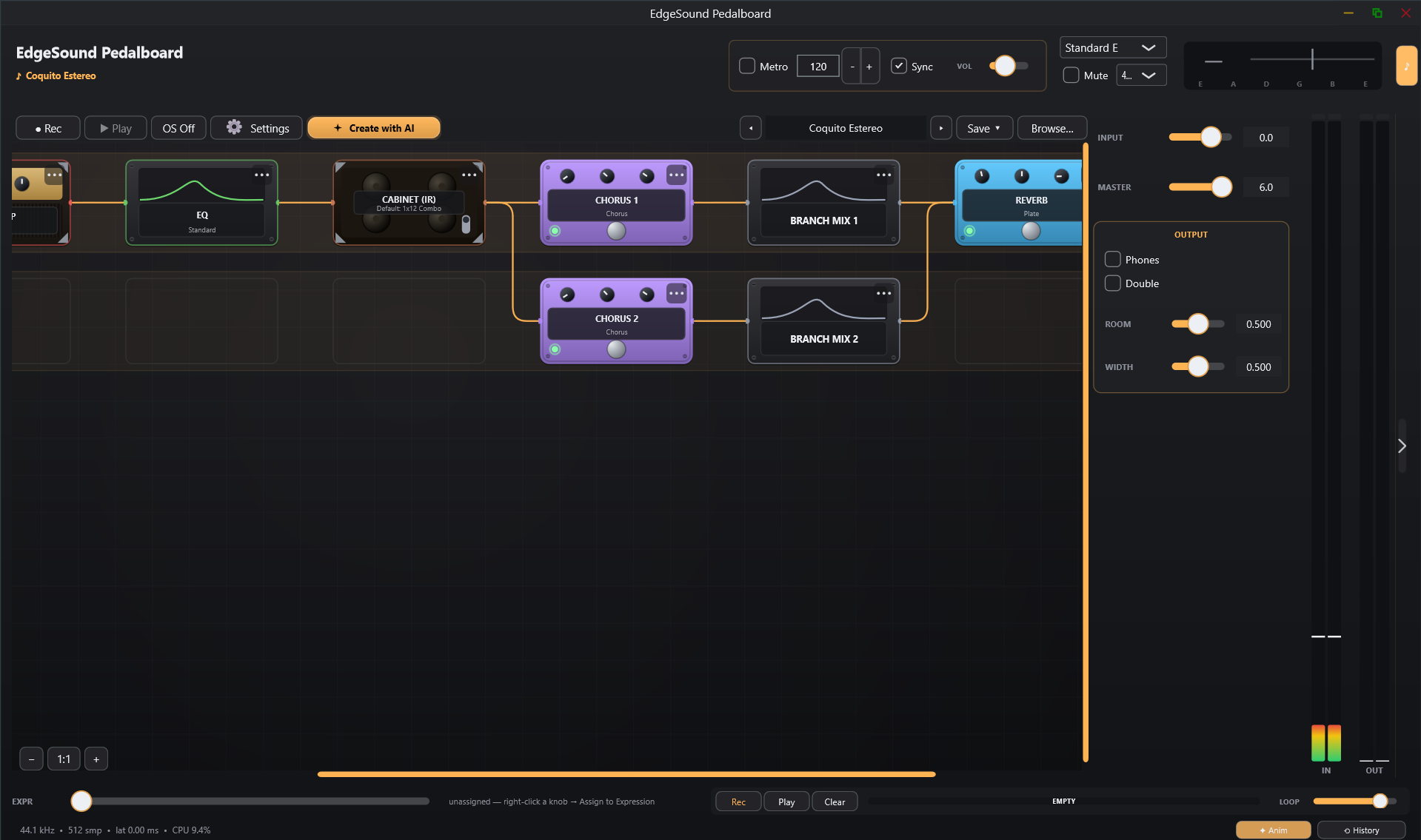
EdgeSound app — parallel signal chain with NAM amp, IR cabinet and effects
🤖 Create with AI
Describe a tone — get a ready preset. Built-in, no API key needed.
53+ effect blocks 396 factory presets Neural amp modeling VST3 + standalone
Real rigs, in the box

Built for real guitars & bass.

Neural captures of real amps and cabinets, played through your real pickups. Single-coils, humbuckers, a bass, a seven-string down-tuned to oblivion — EdgeSound gives it a studio voice.

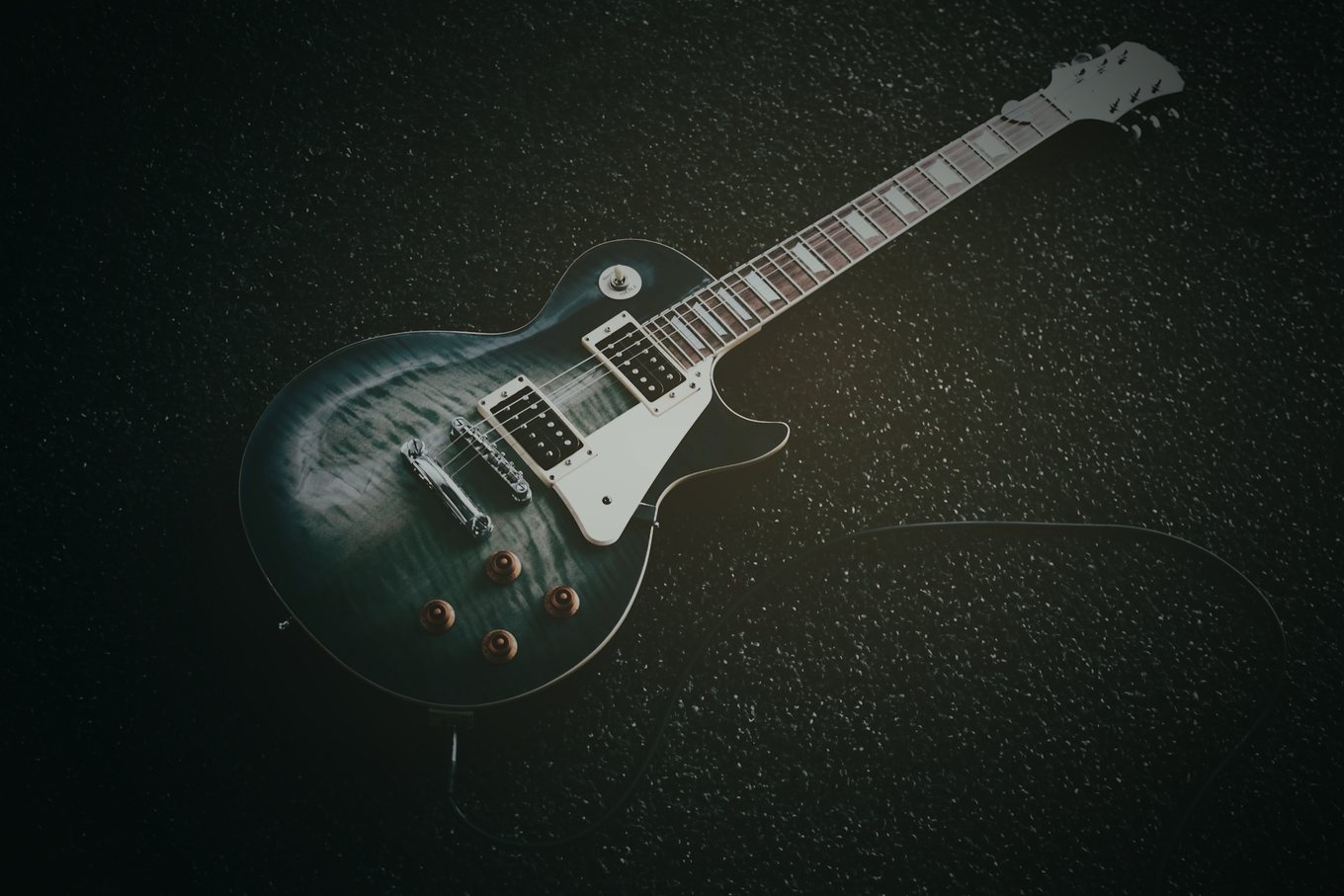
Electric guitar in a dark studio
Your guitar, your voiceAny pickup, any tuning
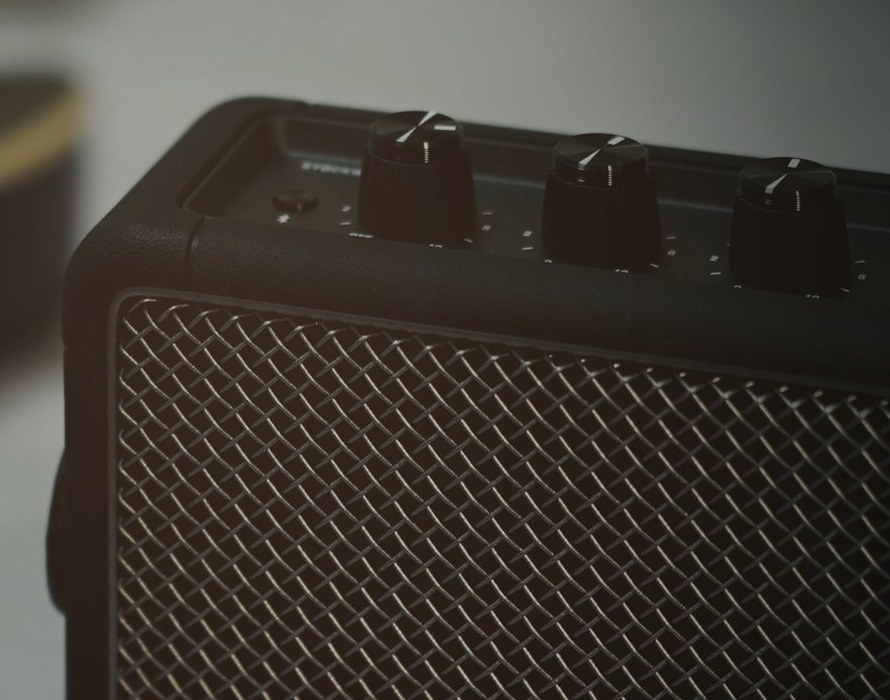
Guitar amplifier close-up
Real amp toneNeural amp modeling (NAM) + studio cabs
Bassist playing at night
Guitar or bass, anywhereHeadphones, monitors or FRFR — silent or loud
New to this?

Here's what EdgeSound does

If you want to play or record electric guitar on your computer, EdgeSound is the one app that does it all — no real amp, no pedals, no expensive gear.

🎸

Plug in

Connect your guitar to your PC through any audio interface. EdgeSound opens as its own app — you don't need a DAW or any other software.

🎚️

Pick a sound

Load one of 396 ready-made tones — clean, blues, rock, metal — or describe what you want and let the AI build it. Sound like the records you love in seconds.

🎧

Play or record

Practice quietly on headphones any time of day, jam through speakers, or hit record to capture studio-quality guitar. Low latency, so it feels like a real amp.

Think of it as a full amp-and-pedalboard rig that lives inside your computer — the same idea as BIAS FX, AmpliTube or Neural DSP, but simpler to use: one $59 one-time for everything, instead of ~$100 per amp.

Hear it

Clean, high-gain and lead — straight from EdgeSound

Real playing through the app — no external pedals, no post-processing.

Clean tone
High-gain / distortion
Modern high-gain lead
New · AI-powered

Describe a tone — get a finished preset

Just describe the sound you're after — “warm blues lead like Gilmour”, “tight modern djent” — and EdgeSound's AI builds a complete, gig-ready preset in seconds. It draws on both the built-in effects, amps and cabs and your own NAM & IR files from any source, wired into a chain you can play right away.

Your words in, a real rig out

Type “singing Petrucci lead” or “tight modern djent”, pick your guitar and how you monitor, and the AI assembles the whole chain — then tweak it in plain language.

  • Built in — no API key needed. Just hit “Create with AI” and play
  • Uses the built-in effects, pedals, amps and cabs — the full EdgeSound rack
  • …and your own NAM (.nam) and IR (.wav) files from any source — your captures, community packs, Tone3000, anywhere
  • Coherence-calibrated: no mud, fizz, warble or runaway reverb
  • Refine in plain language (“darker, less reverb, tighter lows”) and save it as a preset in one click
  • Power users: add your own key (OpenAI / Claude) for unlimited use
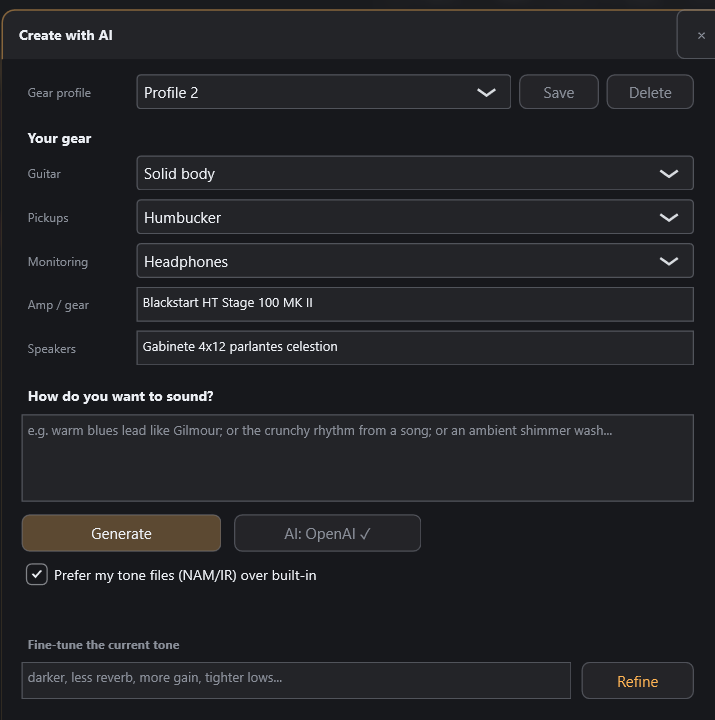
Create with AI panel: describe how you want to sound plus your gear, and EdgeSound builds a preset
Create with AI — your gear + a prompt, and a preset is built

Ready to try it? Give EdgeSound a prompt and it designs a real preset from its own gear and your NAM/IR files — built in, no API key needed. Play your first AI‑made tone in seconds.

All-in-one

An amp sim and pedalboard in one

From crystal cleans to parallel walls of metal. Build the exact rig you imagine, block by block. If you know BIAS FX 2, AmpliTube or Helix Native, you'll feel right at home.

🧠

Authentic amp tone (NAM)

Real captured amplifiers via neural amp modeling (NAM). Load your own .nam captures — a single file, or a whole folder as one rig — plus thousands of free community tones. NAM is a first-class effect block you can chain with anything and run in parallel.

🔊

Studio cabinet sound

Get that mic'd-up studio cabinet sound without a studio: impulse-response (IR) cabs with two placeable microphones you can move for distance, angle and blend.

🔀

Huge, layered sound

Stack multiple amps and blend them into one wide, powerful tone with flexible parallel routing — multi-amp, wet/dry and multiband, however you like.

🎛️

Every effect you need

53+ blocks: drives, an interactive EQ, modulation, pitch, studio delays and reverbs, noise reduction and more — all editable in depth.

🎚️

Sound like the records

396 ready-to-play presets by genre and by artist (based on iconic songs), volume-matched so you can browse without jarring jumps.

🔌

App or plugin

Play live as a standalone app — no DAW needed — or drop it into your DAW as a VST3 plugin. It can even host your own VST3 plugins.

Routing

Build any chain, series or parallel

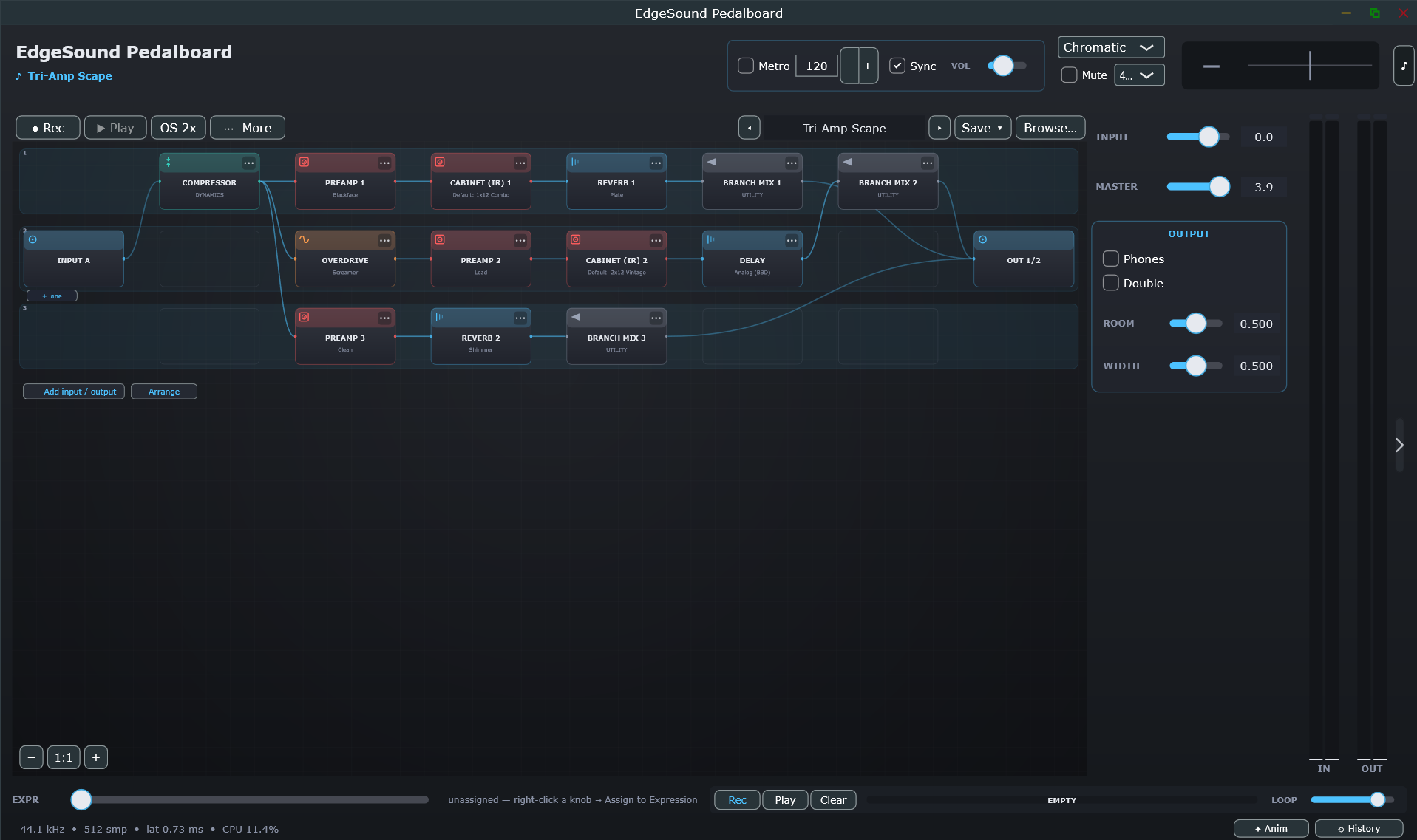
Drag blocks, create lanes and wire whatever you want. Watch the signal flow along the cables.

  • Independent lanes per input (multi-input)
  • Split / Branch Mix nodes for wet/dry and multi-amp
  • Compressor, preamps, cabs, reverb and delay per lane
  • Gesture zoom, edit history and undo
Amp sim pedalboard editor with three parallel signal lanes
Pedalboard view — three parallel lanes blended in Branch Mix
Effects

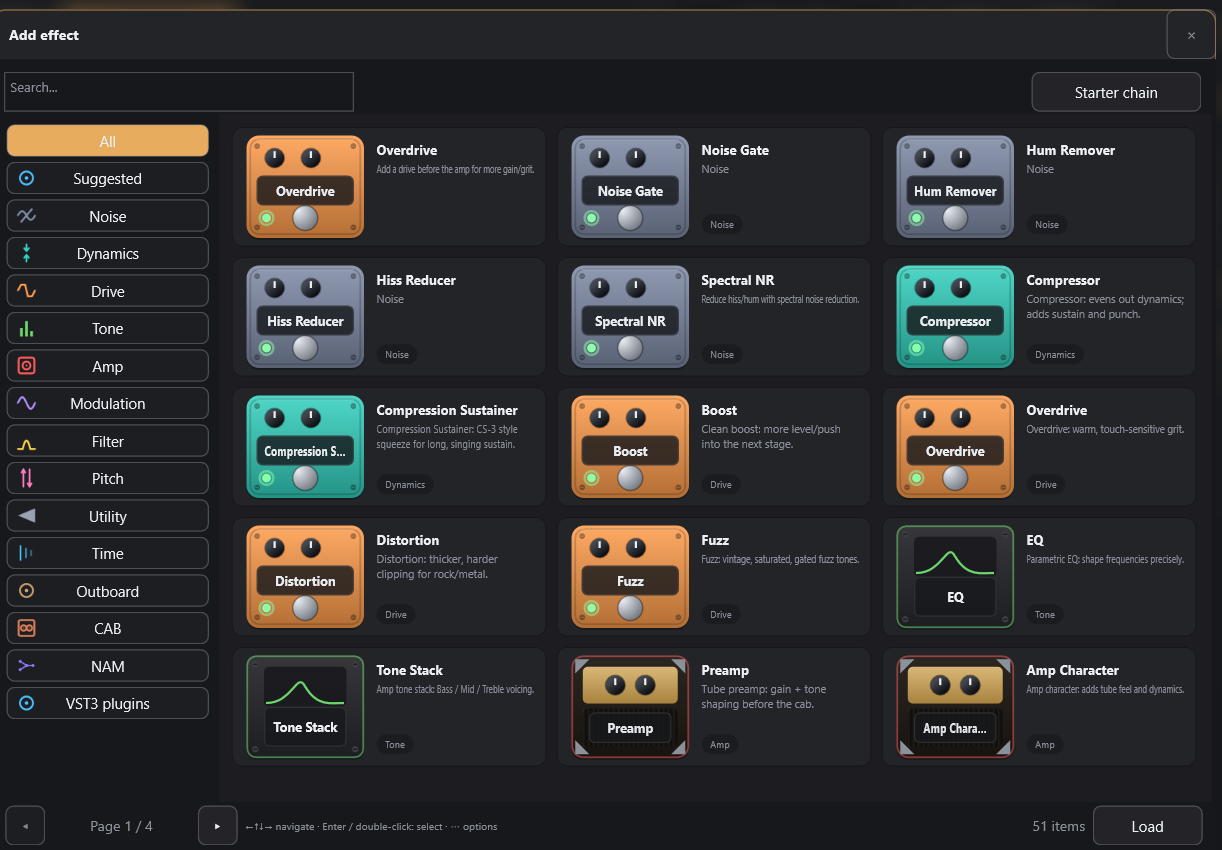
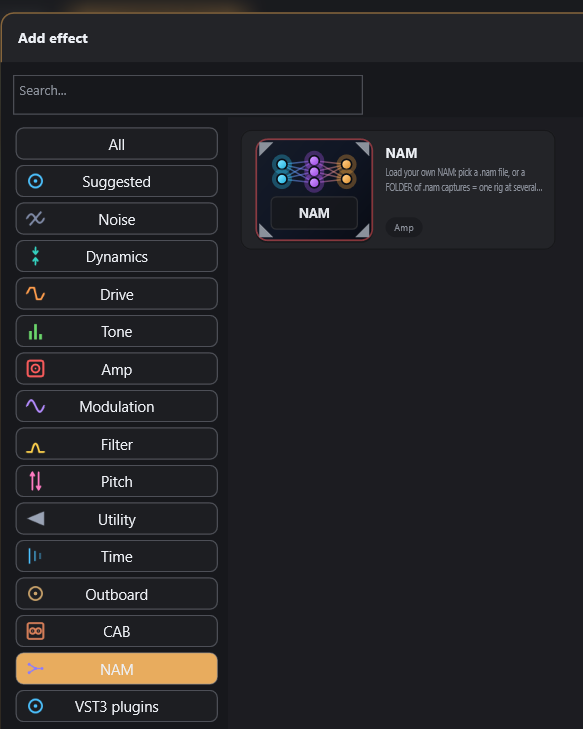
A catalog of 53+ blocks, searchable instantly

Clear categories and a fast search. The “Suggested” button proposes the pedal that fits your chain.

  • Noise reduction: Gate, Hum, Hiss, Spectral NR
  • Drive: Overdrive, Distortion, Fuzz, Boost
  • Tone: parametric EQ, Tone Stack, Preamp
  • And host your own VST3 plugins
Effects browser with categories and 53 amp-sim blocks
“Add effect” browser — 53 blocks by category
Interactive EQ

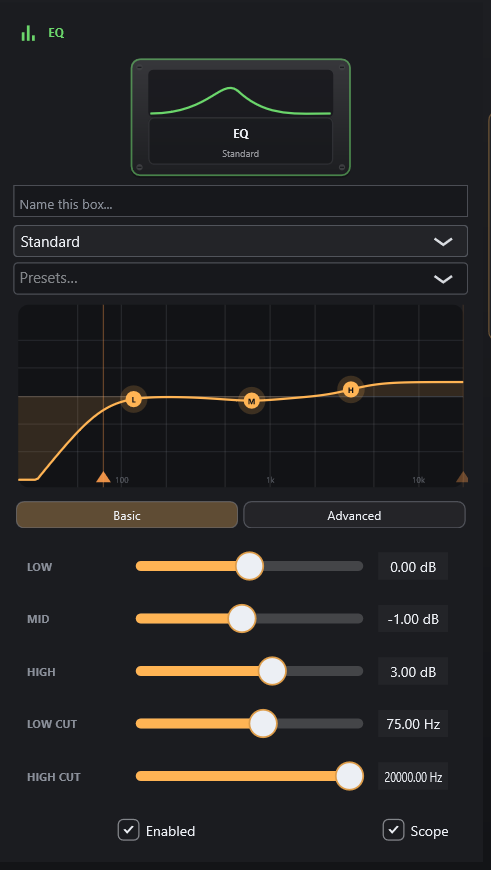
Sculpt your tone with a curve you drag

Drag the response nodes to set frequency, gain and Q. Basic or advanced mode.

  • Parametric EQ with Low/High Cut
  • Dynamic EQ that only breathes when needed
  • Per-block oscilloscope (Scope)
  • Every block can be named and saved
EQ inspector with interactive frequency response curve
EQ inspector — interactive curve and Low/Mid/High controls
Cabinets

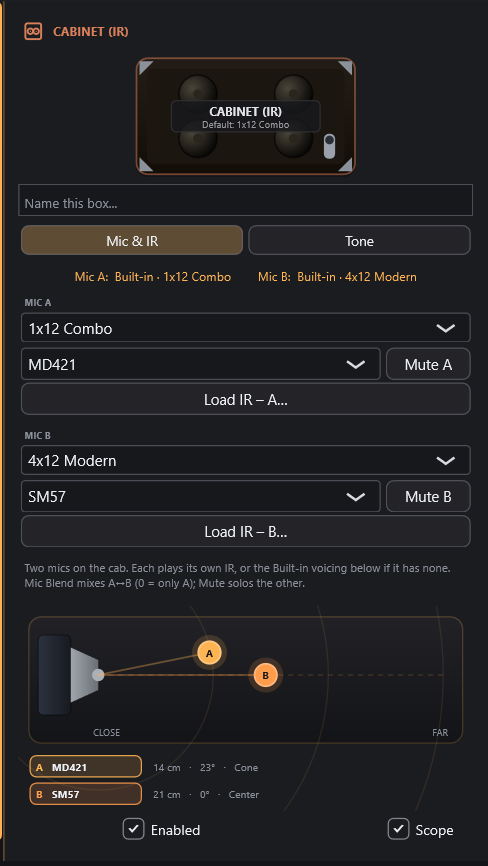
Place the mics wherever you want

Position two mics (SM57, MD421…) on the cone: close/far, on-axis or edge, and blend them.

  • Visual close/far and edge/center placement
  • Blend, alignment and polarity between mics A and B
  • Your own IRs or from your library
  • Eco mode to save CPU
Dual microphone placement on a guitar cabinet IR
IR cabinet — two placeable mics on the speaker cone
Metering

See your tone, not just hear it

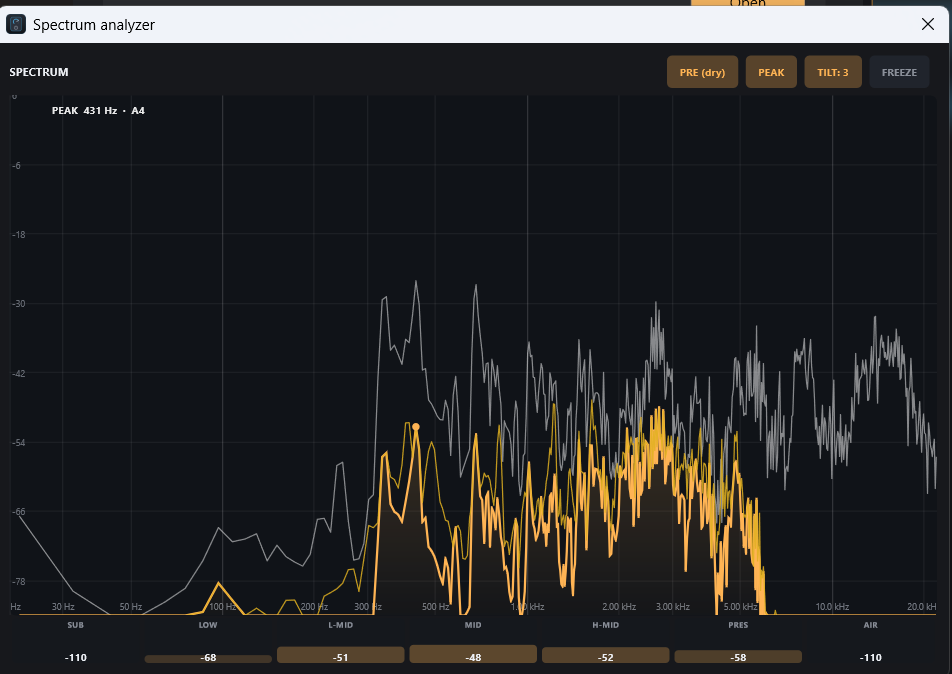
A real-time spectrum analyzer shows input against output, band by band — so you catch mud, fizz or a scooped mid at a glance.

  • Input vs output overlay with peak-hold
  • Per-band readouts (sub, low, mid, presence, air)
  • Tilt and freeze for quick A/B
  • Per-block oscilloscopes across the chain
Real-time spectrum analyzer showing input versus output
Spectrum analyzer — input vs output, band by band
NAM node

Load any amp capture — one file, or a whole folder

Neural Amp Modeler is a first-class block in EdgeSound: drop in a capture and play a real amp with zero added latency — no extra plugin, no license hassle.

  • Load any .nam file — thousands of free community captures, or your own
  • Point it at a whole folder of captures and it becomes one amp at several gain stages — morph between them with the Drive knob (clean → crunch → lead, smoothly)
  • Trim level, snap to a capture and name it — it saves like any other block
  • Chain it with pedals, EQ, drives and cabs, or run several NAM nodes in parallel (dual amps, wet/dry, multiband)
  • Low CPU, zero latency — and “Create with AI” can pick and wire it for you
NAM node in the Add-effect browser: load a .nam file or a folder of captures
The NAM node — a single .nam or a whole folder of captures as one rig
Catalog

Effects for every moment

Everything you need to go from a dry guitar to a finished tone.

Dynamics & noise
Noise GateHum RemoverHiss Reducer Spectral NRCompressorCompression SustainerBoost
Drive & amp
OverdriveDistortionFuzz Tube PreampNAM Amp neuralIR Cabinet
Tone
Parametric EQDynamic EQTone Stack
Modulation
ChorusFlangerPhaserTremolo UnivibeRotaryRing ModSlow AttackAuto-Wah
Pitch & time
Pitch ShifterAutotuneHarmonizer Delay Digital · Analog · Tape · Ping-Pong · Ducking · Modulated Reverb Room · Hall · Plate · Spring · Shimmer · Gated
Utility
Split / MergeBranch MixChromatic Tuner MetronomeLooperRecorder / Re-ampVST3 hosting
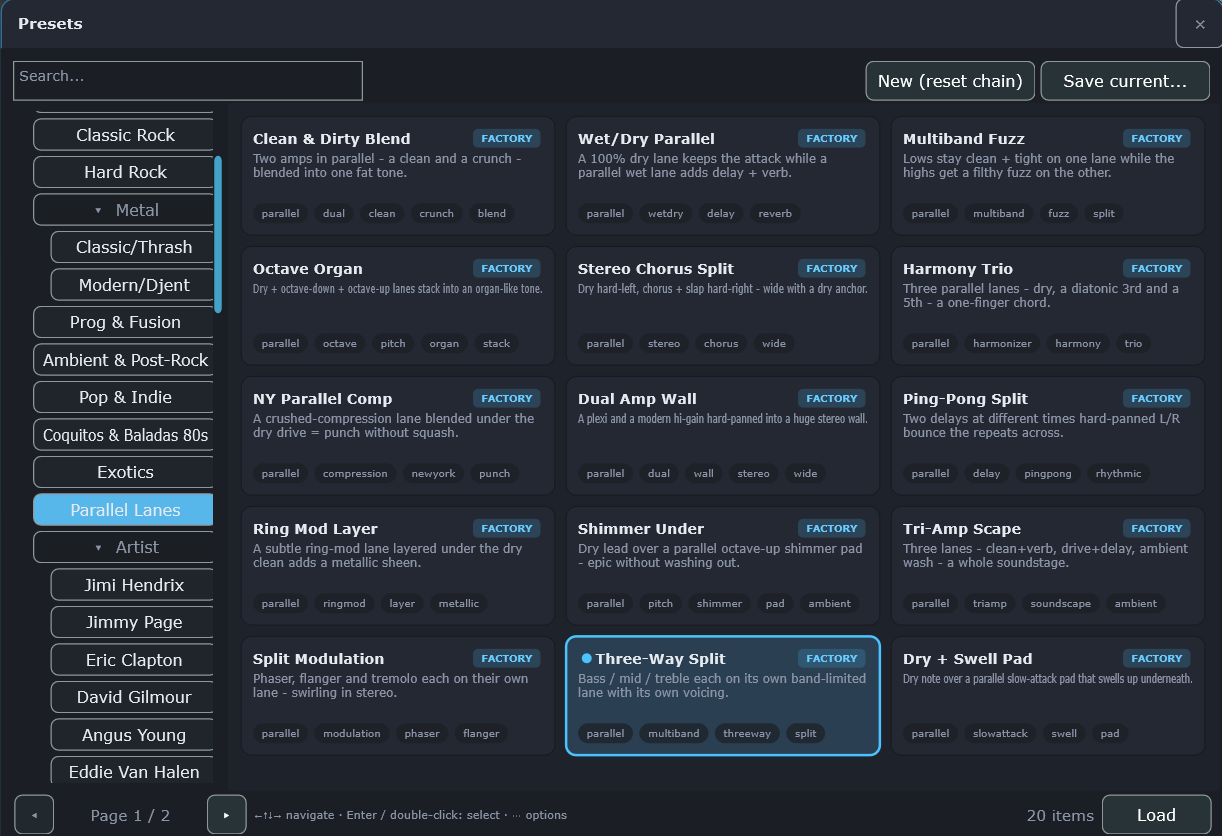
396 presets

Start playing in seconds

Presets by genre and by artist, inspired by iconic songs and loudness-normalized so you can browse comfortably.

By genre
Classic Rockvintage and crunch tones
Hard RockMarshalls with attitude
Metal · Classic/Thrashedge and precision
Metal · Modern/Djenttight lows
Prog & Fusiondynamics and color
Ambient & Post-Rockhuge soundscapes
Pop & Indiebright cleans
Coquitos & 80s Balladslush latin chorus
Exoticsunconventional sounds
Parallel Lanesparallel-routing showcases
By artist
Jimi HendrixLittle Wing, Voodoo Child…
Jimmy Pagelegendary riffs
Eric Claptoncreamy blues
David Gilmoursinging leads
Angus Youngpure rock & roll
Eddie Van Halenbrown sound
Devin Townsendmodern walls
+ 50 guitarists4 tones per artist
Preset browser with genre and artist categories
How it works

Try it free for 9 days

Download the complete EdgeSound and play — the full version, nothing locked, no watermark on your audio. After 9 days, keep it forever for a one-time $59. No subscription.

Download it

One click — a direct Windows installer. No account and no credit card to start.

Play free for 9 days

Every feature unlocked from the first run. Try it in your own rig with your own tones.

Buy it once

Love it? Buy EdgeSound on Gumroad for a one-time $59, paste your license key into the app, and it's yours forever — no subscription, no renewals.

Tutorials

Get started in minutes

Watch the walkthrough, then follow the step-by-step guides to set up EdgeSound.

Full walkthrough — add effects, load amps & cabs, route in parallel, and build a tone from scratch

Connect your guitar with ASIO4ALL (low latency)

EdgeSound needs a low-latency ASIO driver. If your audio interface doesn't ship its own, ASIO4ALL is a free, universal ASIO driver that works with almost any sound card or USB interface.

  1. Download ASIO4ALL

    Get the free installer from the official site: asio4all.org.

  2. Install it

    Run the downloaded installer and follow the prompts (Next → Next → Finish). No configuration is needed yet.

  3. Open EdgeSound → Audio settings

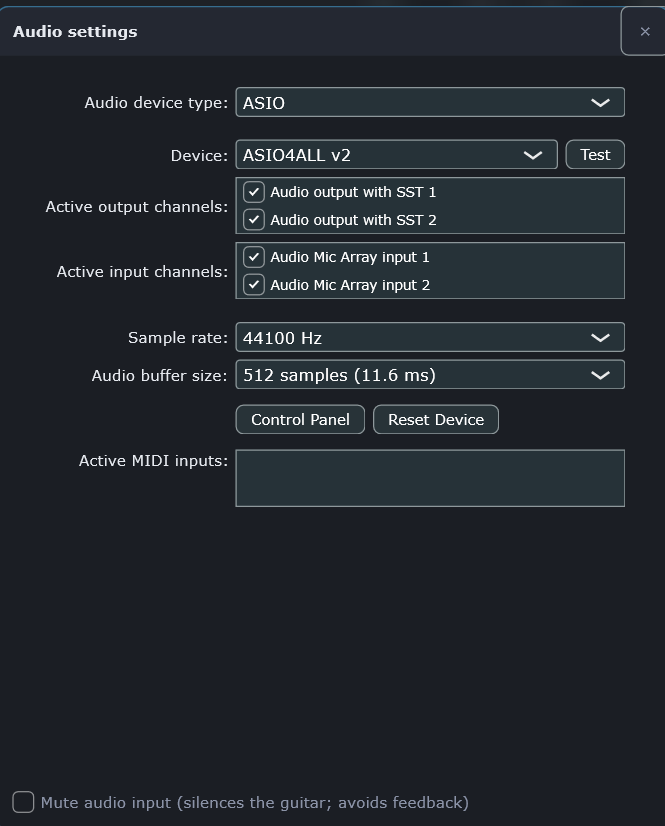
    In EdgeSound, open More (⋯) → Audio settings. Set Audio device type: ASIO and Device: ASIO4ALL v2.

    EdgeSound Audio settings: ASIO device type with ASIO4ALL v2 selected
  4. Turn on your device in ASIO4ALL

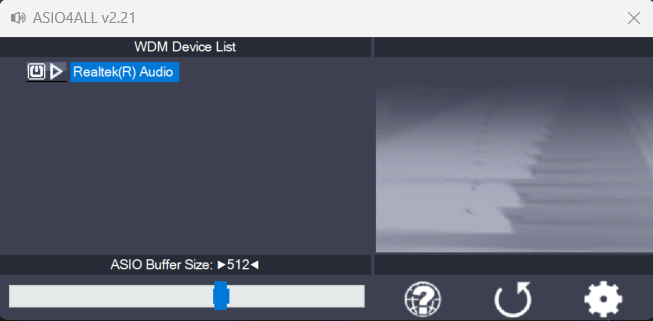
    Click Control Panel. In the ASIO4ALL window, click the power icon next to your interface or sound card (e.g. “Realtek(R) Audio” or your USB interface) so it lights up blue and becomes active.

    ASIO4ALL control panel with the audio device enabled and 512-sample buffer
  5. Set sample rate & buffer

    Back in Audio settings, choose 44100 Hz and a buffer of 512 samples (lower = less latency but more CPU; raise it if you hear crackling). Make sure your input and output channels are checked.

  6. Play!

    Plug your guitar into your interface, load a preset, and play — you should hear it through EdgeSound. If your speakers feed back, enable “Mute audio input”.

Get EdgeSound

Start your 9-day free trial

Download the full version and play — every feature unlocked. After 9 days, keep it forever for a one-time $59. Windows 10 and 11.

$59 one-time

9-day free trial · standalone + VST3 · Windows 64-bit

  • Free for 9 days — every feature unlocked, no watermark
  • Standalone app + VST3 plugin
  • Create with AI — built in, no API key needed
  • Plays your own NAM & IR captures
  • Pay once, yours forever — one license covers 2 machines
⬇ Download & start free trial (Windows)

Direct download · ~13 MB · no account, no card to start. By downloading you accept the terms and privacy policy.

Ready to keep it? Buy — $59 one-time ♥ and unlock the app with your license key.

Frequently asked

Quick answers

What do I need to play guitar through my computer?

Your guitar, an audio interface (any model — it's the box that connects the guitar to the PC), headphones or speakers, and EdgeSound. Nothing else: no amplifier, no pedals, no recording software.

Can I practice quietly with headphones?

Yes — that's what most people use it for. Plug your headphones into your interface and you get a full mic'd-up amp sound at any volume, at any hour, without disturbing anyone.

Can I record guitar without an amp?

Yes. EdgeSound gives you the studio sound of a mic'd amplifier straight into your recording, either as a standalone app or as a VST3 plugin inside your DAW.

Do I need a DAW or other software?

No. EdgeSound runs on its own as a standalone app — open it and play. If you already use a DAW, you can also load it there as a VST3 plugin.

Is it like BIAS FX, AmpliTube or Neural DSP?

Same category — a guitar amp simulator and pedalboard — but simpler to use, and one $59 one-time for everything instead of ~$100 per amp. It also plays your own amp captures (NAM) and cabinet impulse responses, which most of those don't.

What is NAM (neural amp modeling)?

It's a way of capturing a real amplifier so it sounds and reacts like the original. EdgeSound plays these captures out of the box, and there are thousands of free ones from the community you can load — no extra cost.

Will it run on my computer?

Windows 10 or 11 (64-bit). It's built to sound good on modest gear — typical latency is under 1 ms, so it feels like a real amp under your fingers.

How much does it cost?

A one-time $59 after a 9-day free trial. One purchase unlocks every feature — amps, cabs, effects, Create with AI and updates — on up to 2 of your machines. No subscription, no renewals.

Is there a free trial?

Yes — 9 days, the complete app with every feature unlocked and no watermark on your audio. No credit card to start; just download and play. When the trial ends, buy it once to keep going.

How do I buy and unlock the app?

Buy EdgeSound on Gumroad for a one-time $59 and you'll get a license key. In EdgeSound, open the license screen, paste the key, and the app unlocks permanently — no subscription, no periodic re-checks.

Do I need an API key to use the AI?

No. “Create with AI” is built in and works out of the box — just describe a tone and get a ready-to-play preset (a few AI generations a day are included). Power users can add their own OpenAI or Claude key in the app for unlimited use.

Is it really a one-time payment?

Yes. You pay $59 once and EdgeSound is yours forever — no subscription, no recurring charges. To help improve EdgeSound the app can also send anonymous usage statistics, but only if you opt in on first run, and you can turn it off anytime in Settings.

Can I use my own NAM and IR files?

Yes. You can load your own NAM captures (.nam) and cabinet impulse responses (.wav) from your library.

Contact

Get in touch

Questions, feedback or need a hand setting up? Send us a message.

Please enter your name.
Please enter a valid email.
Please enter a message.